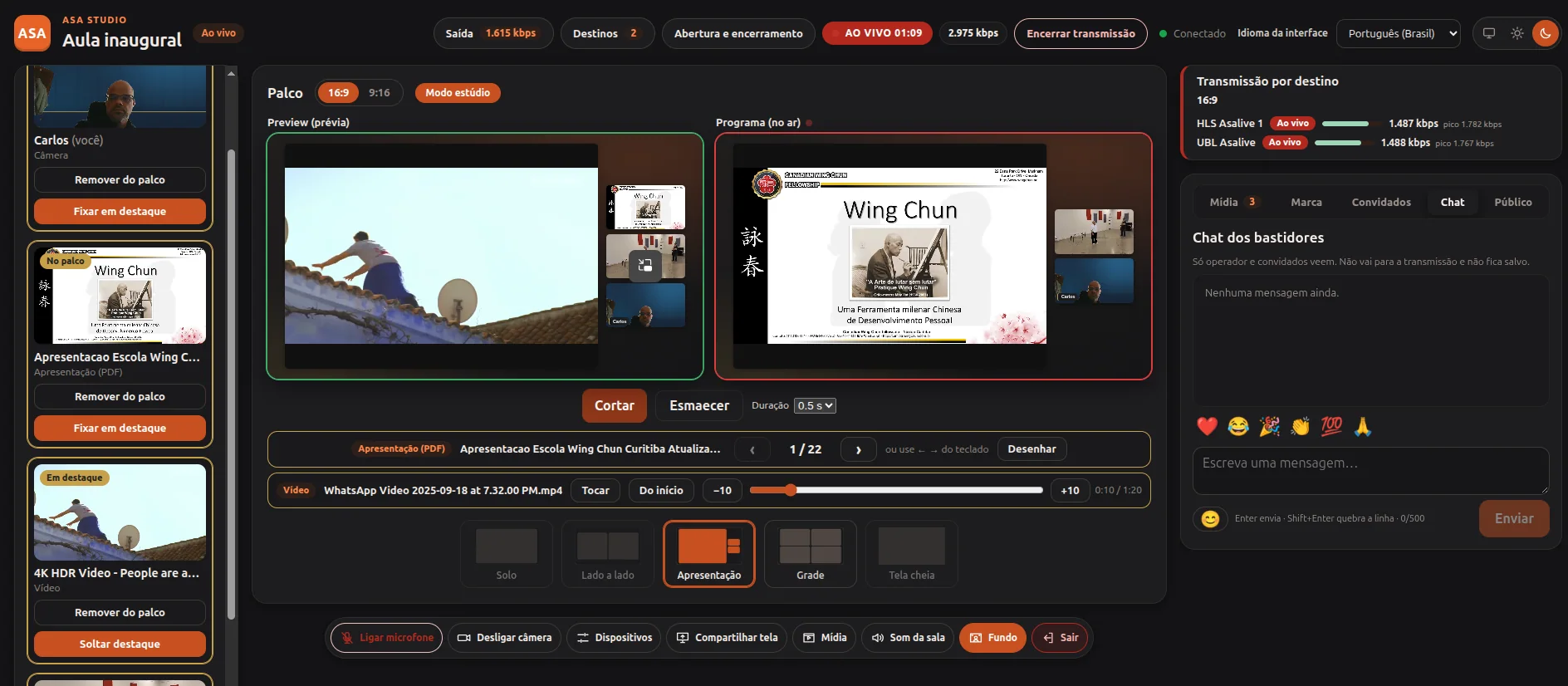
Real ASA Broadcast Cloud studio capture showing preview, program, controls, and backstage chat.

ASA BROADCAST CLOUD · LIVE STUDIO

ASA Broadcast Cloud logo

Your live event, produced with greater control from start to finish.

Prepare the stage, organize guests and content, and take your stream live from a studio you access in your browser. ASA Broadcast Cloud helps your team run events, classes, and live programs with brand identity and audience interaction.

Direct answer

ASA Broadcast Cloud brings together browser-based tools to organize participants, prepare scenes and content, run a live production, and distribute the signal to compatible destinations. Your team can prepare what will appear before taking each element live. It is designed for companies, educational institutions, churches, production teams, and organizations that run scheduled live events or sessions and need an organized production workflow.

HOW IT WORKS

From preparation to live

  1. 01

    Prepare backstage

    Organize materials, invite participants with a link, and prepare the stage and backstage.

  2. 02

    Build the composition

    Choose a layout, share presentations or your screen, and adjust brand elements.

  3. 03

    Review before going live

    Use Preview and Program to review the composition before it goes live.

  4. 04

    Distribute the signal

    Send the stream to one or more compatible destinations, according to the contracted scope.

  5. 05

    Follow audience participation

    See audience participation on the event page, with the features enabled for your project.

FEATURES BY NEED

Tools to organize your production

Browser-based production

Open the studio on a computer or mobile device without installing production software. Invite participants by link, talk backstage, and organize who appears on stage. Choose single-camera, full-screen, side-by-side, presentation, and grid layouts in horizontal or vertical formats.

Content and brand identity

Share your screen and present PDFs, videos, and images, then add brand elements. The studio can compose logos, banners, QR codes, on-screen questions, timers, and intermission scenes. Specific features may vary with the contracted configuration.

Audience interaction

The public event page can bring together the player and participation tools such as moderated chat, reactions, polls, or quizzes when enabled for the project. Automatic captions may be available in the player; as with any speech recognition, errors can occur.

Distribution to compatible destinations

Send the signal to different platforms or servers that accept RTMP/RTMPS, according to the project setup. Quality can be adjusted by destination. Streaming keys are stored encrypted.

Support for classes and training

For educational activities, the studio may provide a writing and drawing board, annotated PDFs, and a laser pointer, depending on the features enabled for the organization.

WHO IT SERVES

A production workflow that fits your event

  • 01Companies and communications teams: events, launches, meetings, and internal communications.
  • 02Educational institutions: open classes, courses, training, and seminars.
  • 03Churches and communities: gatherings and programs streamed to an audience.
  • 04Production teams and broadcasters: live sessions with stage control and digital distribution.

FAQ

Frequently asked questions

Do I need to install software?

No. The studio runs in a browser on a compatible computer or mobile device. Available features may vary by device, browser, and connection.

Do guests need to create an account?

Guests can join through an expiring access link without installing a program. The exact setup is defined for each event.

Can I stream to more than one platform?

Yes. Distribution to multiple RTMP/RTMPS-compatible destinations can be configured for the project.

Does ASA Broadcast Cloud stream 24/7?

The studio is designed for scheduled events and sessions. If you need continuous streaming, contact the team to discuss a suitable solution.

Is there an audience limit or a fixed price?

Capacity and investment depend on the format, duration, estimated audience, destinations, and required features. Contact the team to assess the right setup.

Does the platform record and make the video available afterward?

Recording and on-demand access depend on the setup and contract. Contact the team to learn which options apply to your project.

Are automatic captions always accurate?

No. Automatic captions may contain errors and should be reviewed when accuracy is essential.

NEXT STEP

Let’s discuss your event format

Tell ASAWEB what you plan to stream, when it will take place, the expected audience, and your channels. The team will assess the requirements and recommend next steps.

Chat with ASAWEB on WhatsApp
Talk to AsaWeb